

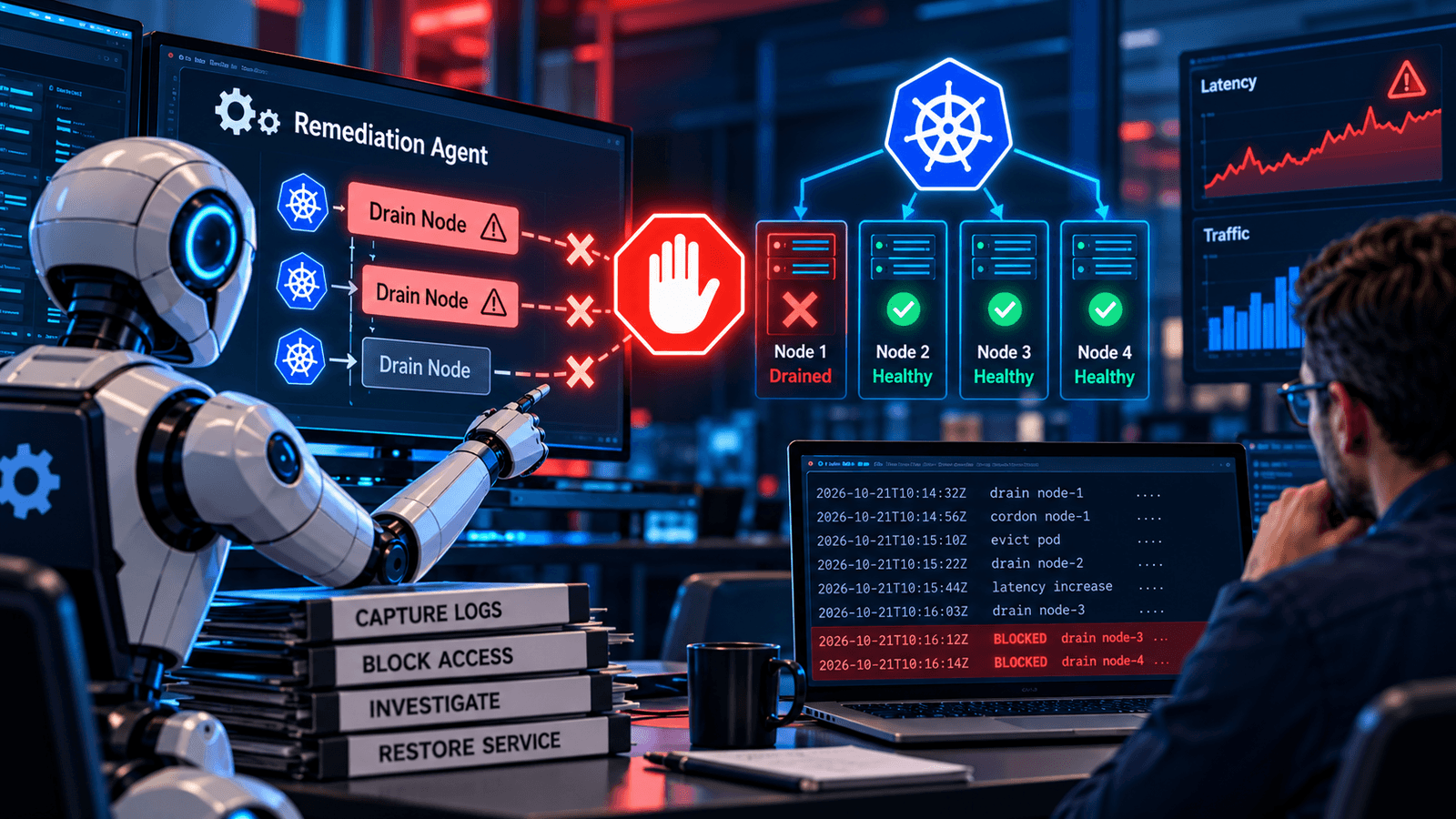
Stop the agent from causing further damage. Capture logs before cleanup begins.
A remediation agent sees rising latency and drains a node. The remaining nodes take on more load, so latency rises again. The agent repeats its diagnosis and removes more capacity. Operators now have two problems: The original slowdown and an automated repair that keeps making it worse.
This playbook is for agents that can change external systems. A wrong answer needs correction; unsafe tool calls may need immediate containment. The seven steps below explain how to stop those calls, establish what happened and restore service without restarting the same failure.
Scenario: A Remediation Agent Drains Healthy Nodes
Consider an illustrative Kubernetes checkout service under a traffic spike. Its remediation agent mistakes high CPU usage for a node failure and drains a healthy node. Displaced workloads move to the remaining nodes, where spare capacity is already limited. The agent sees worsening latency and starts another drain.
Kubernetes drain normally respects PodDisruptionBudgets. Those budgets limit permitted disruptions; they do not prove that the remaining capacity can handle the traffic. This example assumes evictions are allowed and that the configured budget leaves too little spare capacity for the spike.
High CPU usage alone is not enough evidence to authorize a drain. I would require a capacity check and an approval step before allowing another disruptive action. A repair that worsens service health should stop automatically.
The response begins by blocking further drain requests and pausing the affected agents. Operators quarantine pending actions while another responder captures logs. They check which nodes were cordoned, restore usable capacity where safe and verify checkout. The agent stays paused.
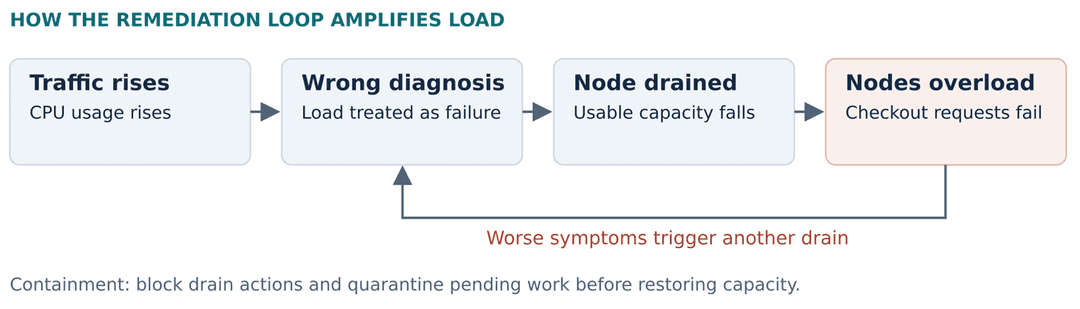
Figure 1: An Illustrative Failure Loop
The scenario does not describe an employer or customer incident
The Incident Response Workflow
Stopping execution, blocking tool access and saving evidence can run in parallel. Do not wait for a worker to exit before blocking dangerous requests.
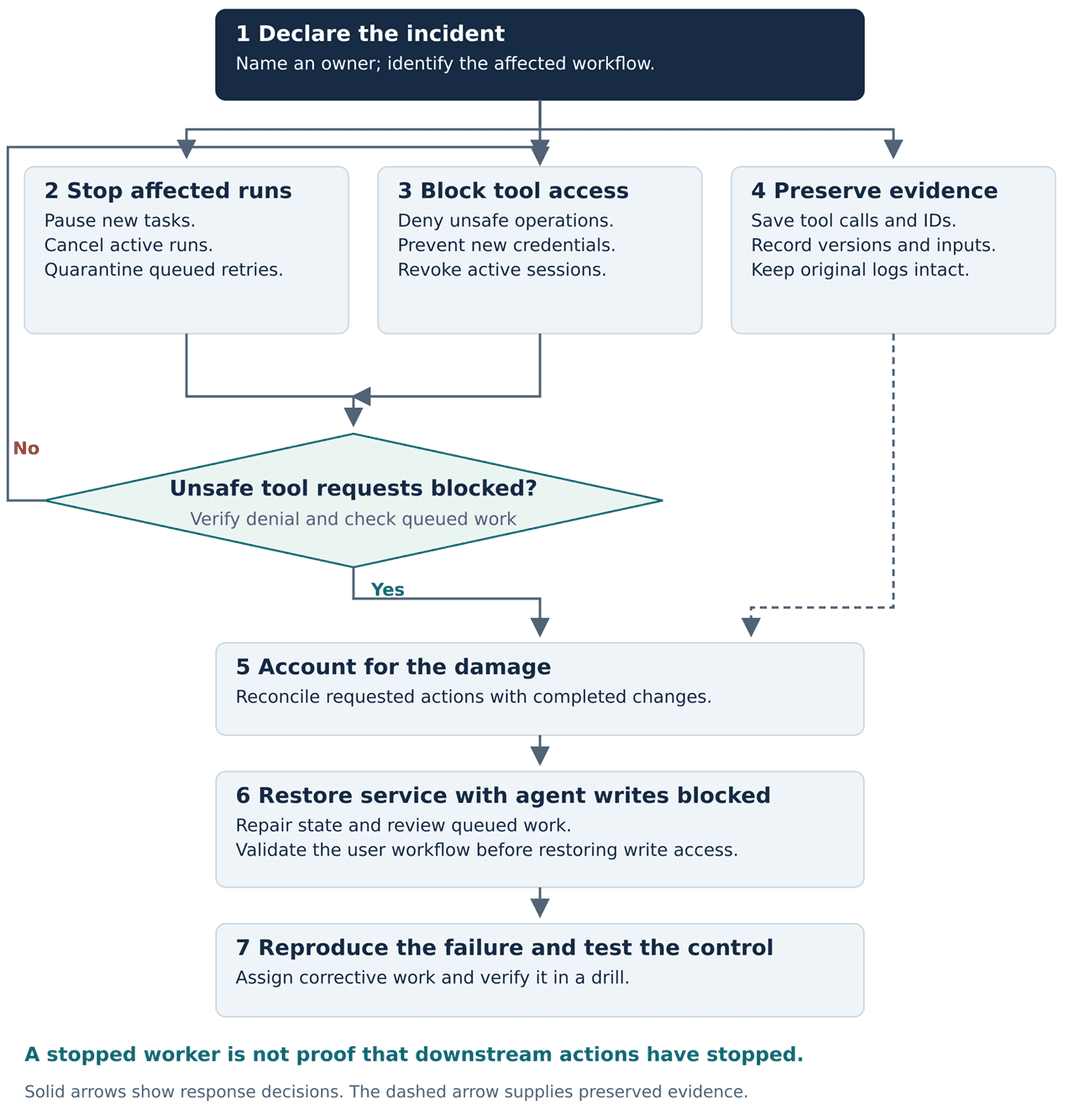
Figure 2: Keep Agent Write Access Blocked While Service Recovery Proceeds
Accepted downstream requests still need to be accounted for.
Contain the Incident and Preserve Evidence
Step 1: Declare the Incident and Name one Owner
Start with four questions: What can the agent change? Is it still acting? What customer workflow is affected? Which identity is making the calls? Use the answers to set incident severity and containment scope. You do not need a complete diagnosis to stop destructive actions.
Name an incident owner to coordinate decisions and record them. Specialists apply the controls in their areas. Stop the affected workflow first; widen containment if shared credentials or unreliable routing make a narrower stop unsafe.
Step 2: Stop the Affected Agents and Queued Work
Pause schedules and task consumers. Request cancellation of active runs, then quarantine retries and delayed tasks. A cancellation flag between steps and a hard execution timeout help limit continued work. The stop path must remain available when the application dashboard or deployment pipeline fails.
Check downstream workers too. An agent can exit while work it already dispatched keeps running. Identify requests already accepted by an external system; blocking later calls will not reverse those actions.
Step 3: Block Access and Revoke Credentials
Run this step alongside the stop. Deny unsafe operations at the tool boundary, prevent new credential issuance and revoke active sessions where supported. Keep a separate responder identity available for repair work.
Key rotation alone may leave temporary sessions usable. AWS documents a policy for denying older role sessions, but later sessions can still obtain access unless that path is blocked. Test denial safely against the same authorization path the agent uses. Inspect downstream audit records rather than relying on a green stop indicator.
Step 4: Preserve Evidence Before Cleanup
Save tool requests with their run IDs and timestamps. Capture the tool responses, prompt version, model identifier and relevant context. Preserve agent memory where it could have influenced the action. Begin this work at declaration if staffing allows, without delaying containment.
Keep originals separate from investigation copies and restrict access to sensitive inputs. Logs establish what the system received and did; they cannot provide a complete account of a model’s internal reasoning. Record missing evidence as unknown instead of filling gaps with a plausible explanation.
Restore Service Without Repeating the Failure
Step 5: Account for Completed and Uncertain Actions
Match each tool request to a downstream outcome. Mark it completed, rejected, still running or unknown. A timeout does not prove that a write failed. Avoid automatic replay until uncertain outcomes have been resolved, especially for payments or messages that cannot simply be undone.
In the drain scenario, inspect cordoned nodes and eviction events. Check pending workloads and checkout errors. The repair plan should follow those findings; a list of agent commands is not enough.
Step 6: Recover With Agent Writes Blocked
Restore usable capacity and repair damaged state. A previous prompt or model version may help, but a rollback does not remove poisoned context or cancel queued work. Review both before considering a restart.
Keep operations manual or read-only while validating the customer workflow. Before restoring write access, require evidence that unsafe requests are blocked, uncertain actions are accounted for and the failure case passes a test. Define an observation period based on the workflow’s retry and execution limits, not a universal five-minute rule.
Reintroduce access to a small scope first. Expand only while service health stays within the agreed limits. If it worsens after remediation, stop the agent again. Service recovery and agent restart are separate decisions.
Step 7: Reproduce the Failure and Verify the Fix
Follow the chain from input to decision to tool request. Check whether a prompt change, unexpected tool output or untrusted context explains the action. Reproduce the failure in isolation and test the control that should block it.
For node drains, preserve disruption budgets and add a capacity check. Limit concurrent actions, require approval for further capacity reductions and stop remediation when it worsens the service. Assign corrective work an owner and verify completion in a drill.
Measure the Stop Where Actions Happen
Record the incident declaration time, when unsafe requests are last accepted and when already accepted actions finish. A worker exit time can hide continued damage. If logs cannot establish the last accepted request, say so and keep the affected write path blocked.
The queue exercise on the next page demonstrates that distinction with a small deterministic model. Its results illustrate a control failure; they are not production performance measurements.
A Queue Exercise That Tests the Stop
A deterministic Python simulation compares stopping an agent worker with stopping the worker and blocking queued tool requests. The model contains no LLM and does not run Kubernetes. Its purpose is to test one failure mode: Dispatched work surviving a worker stop.
Setup and Assumptions
The model begins with four available nodes. Each node contributes an assumed 650 requests per second of usable capacity, against fixed demand of 1,800 requests per second. These are chosen inputs, not benchmark measurements. A completed drain removes one node from available capacity.
Three tasks are dispatched at seconds 2, 9 and 10. They attempt drains at seconds 5, 15 and 20. The worker stops at second 12, after all three tasks have been dispatched. In the second case, the tool boundary also starts rejecting drain requests at second 12. The check happens before each queued drain executes.
Simulation Results
Table 1: Computed Outcomes From the Deterministic Queue Model
| Outcome | Worker Stop Only | Worker Stop Plus Tool Block |
|---|---|---|
| Drains Completed After the Stop | 2 | 0 |
| Queued Drains Rejected | 0 | 2 |
| Nodes Still Available | 1 | 3 |
| Modeled Capacity | 650 requests/s | 1,950 requests/s |
| Modeled Capacity Shortfall | 1,150 requests/s | 0 requests/s |
Capacity equals available nodes multiplied by the assumed per-node capacity.
Stopping the worker leaves two dispatched tasks able to drain nodes. Blocking requests at execution prevents those two actions. The first drain, completed at second 5, remains in both cases. The block contains further changes; it does not undo the earlier one.
This model excludes eviction budgets, autoscaling, authorization delays and actual request processing. It does not demonstrate LLM behavior or predict checkout throughput. A real drill should also test a request accepted before the block and prove how its eventual outcome is reconciled.

Frequently Asked Questions
1. Why is stopping an AI agent worker insufficient during an incident?
2. What evidence should teams preserve during an AI agent incident?
3. How can organizations safely restart AI remediation agents after an incident?

Vishal is a cloud engineer with more than seven years of experience across AWS and Google Cloud. His work includes troubleshooting production systems and helping enterprise customers resolve cloud infrastructure issues. He writes about cloud reliability, incident response and the operational risks of AI automation.